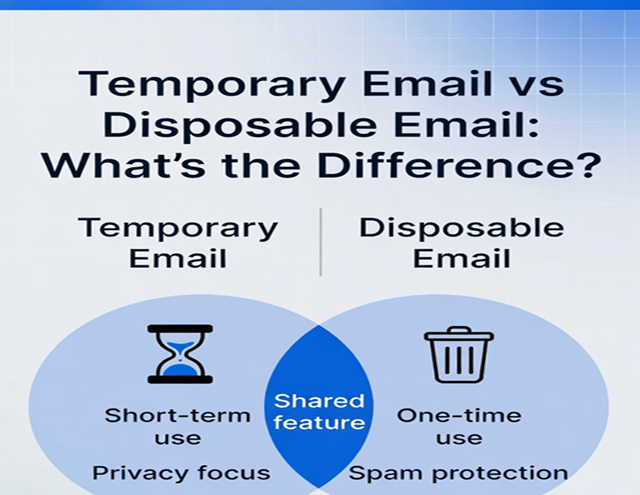
In the world of online privacy tools, terms like temporary email, disposable email, throwaway email, burner email, and temp mail get thrown around interchangeably. Most people use them as synonyms — and in everyday conversation, they usually mean the same thing. But technically, there are subtle (and sometimes meaningful) differences depending on the service provider and how the feature is implemented.
This guide clarifies the real distinctions in 2026, when privacy tools have evolved with better controls, longer lifespans, and more sophisticated options. We'll break down definitions, key differences, when the terms overlap completely, and which tool to choose for maximum spam protection and privacy.
Are "Temporary Email" and "Disposable Email" the Same Thing?
Short answer: Yes — in 99% of cases, they refer to the exact same concept.
Most services, blogs, security experts, and users treat them as synonyms:
- A temporary email is an email address designed to exist for a limited time before automatically expiring.
- A disposable email is an email address you can "dispose of" (delete or abandon) after use, often with the same short lifespan.
Industry sources from 2025–2026 consistently describe them this way:
- "Temporary emails, also called disposable or throwaway emails..." (common phrasing across providers and reviews)
- "A disposable email address, also known as a temporary email or throwaway email..." (standard definition in privacy guides)
They both serve one core purpose: receive verification codes, newsletters, or sign-up emails without exposing your real inbox to spam, tracking, or breaches.
Bottom line for most users: Don't overthink it. If someone says "temp email" or "disposable email," they're almost always talking about the same quick, anonymous, self-destructing inbox.
Key Differences When They Actually Diverge
While the terms overlap heavily, some providers draw distinctions based on control, lifespan, and features:
1. Lifespan and Self-Destruction
- Temporary Email — Often emphasizes automatic expiration (e.g., 10 minutes, 1 hour, 24 hours, or a few days). Once the timer hits zero, the inbox and address vanish forever — no user intervention needed.
- Disposable Email — May allow more user control: you can manually delete/disable the address whenever you want, or even extend/restore it in some premium setups.
Example: Classic 10-minute services lean "temporary" (fixed timer), while services that let you keep an address until you choose to burn it lean "disposable."
2. Management and Control
- Pure Temporary — No account, no login, no recovery. It's truly "fire and forget." Ideal for ultra-short tasks.
- Disposable (Managed) — Some advanced services let you create, pause, delete, or even forward from the address. You might log in to manage multiple disposables.
This is where the line blurs into email alias or masked email territory (e.g., services like IronVest, Burner Mail, or Proton aliases), which are longer-term and forward to your real inbox.
3. Features and Capabilities
- Temporary/Classic Temp Mail — Usually receive-only, public inbox (anyone with the address can view), no sending, basic interface.
- Disposable (Advanced) — May support sending replies, attachments, custom domains, or private inboxes.
In practice:
- Free services (10 Minute Mail, Guerrilla Mail) = mostly temporary-style (auto-expire, simple).
- Paid/privacy-focused tools = more disposable-style (user-controlled deletion, longer use).
Comparison Table: Temporary vs Disposable Email
| Feature | Temporary Email (Classic Temp Mail) | Disposable Email (Broader/Managed) |
|---|---|---|
| Lifespan | Fixed timer (minutes to days), auto-deletes | Often user-controlled (delete when ready) |
| Creation | Instant, no signup | Instant or with light account for management |
| Privacy Level | Fully anonymous, no personal info | Anonymous, but may require login for advanced features |
| Inbox Access | Public or session-based | Can be private or password-protected |
| Sending Emails | Usually not possible | Sometimes possible (especially premium) |
| Best For | One-time verifications, quick signups | Repeated short-term use, testing, controlled disposal |
| Examples | 10 Minute Mail, Temp Mail, YOPmail | Guerrilla Mail, some premium tools |
Related Terms You Might See
- Throwaway Email — Exact synonym for both; emphasizes "use once and toss."
- Burner Email — Borrowed from "burner phone"; implies complete discardability, often used interchangeably.
- Email Alias / Masked Email — Not the same. These forward to your real inbox permanently (or until deleted) — great for long-term segmentation, but not truly temporary/disposable.
Which One Should You Use in 2026?
For most people protecting against spam and random signups, the classic temporary/disposable style is perfect — quick, free, zero commitment.
Top recommendation (consistent across current reviews and reliability):
- https://temp-email.me — Fast generation, reliable delivery, multiple fresh domains, no registration ever needed. Ideal whether you call it temporary or disposable.
Other strong free options:
- 10 Minute Mail (ultra-short, extendable)
- Guerrilla Mail (attachments, longer sessions)
- Temp Mail providers (mobile-friendly)
For longer-term needs with more control, consider alias services (Proton, SimpleLogin, etc.) — but that's a different category.
Final Verdict
Temporary email = disposable email for the vast majority of use cases and services in 2026. The subtle differences (auto-expire vs user-delete) rarely matter for everyday privacy protection.
The important thing isn't the label — it's using something other than your primary email for random online activities.
Stop risking spam floods, phishing, and breaches. Head to https://temp-email.me right now, grab an instant temporary/disposable address, and keep your real inbox clean forever.
Your privacy deserves better than handing out your main email like candy. Make the switch today — one click, zero spam, total control.