Your email address remains the most valuable piece of personal data for cybercriminals. It's the entry point for spam floods, credential-stuffing attacks, spear-phishing campaigns, business email compromise (BEC), and ransomware delivery. Hackers don't need to hack your device first — they just need your email to start the chain.
Understanding how they collect emails at scale is crucial for protection. Cybercriminals use a mix of automated, low-effort techniques and more targeted, sophisticated methods. Many rely on publicly available data or voluntary sharing, while others exploit breaches and dark-web marketplaces.
This detailed breakdown covers the primary ways hackers harvest email addresses today, why each method works so effectively, and real-world implications in the current threat landscape.
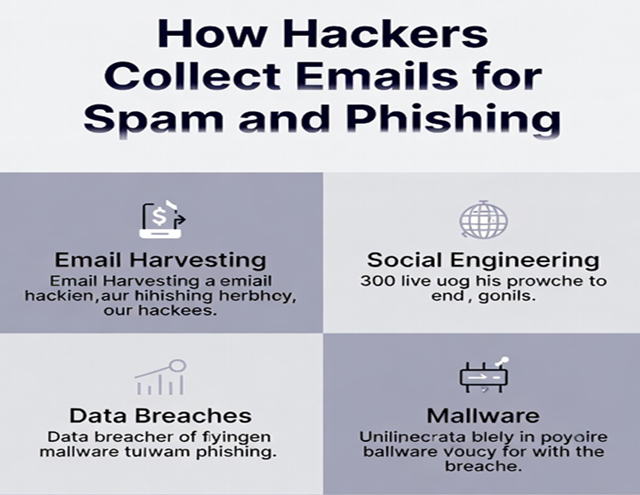
1. Email Harvesting Bots and Web Scraping (The Most Common Method)
Automated programs — called harvesters, scrapers, or spiders — crawl the internet 24/7 looking for anything resembling an email address.
- They scan websites, blogs, forums, comment sections, social media profiles, public directories, WHOIS records, Usenet archives, and old mailing list pages.
- Bots recognize patterns like "@" followed by a domain (e.g., name@example.com) and collect millions in seconds.
- Tools like theHarvester (open-source) or paid services aggregate results from Google, Bing, LinkedIn, and more.
Why it works in 2026: The web is still littered with exposed emails from years ago. One forum post or newsletter signup can feed bots indefinitely. Harvested lists are cheap or free on underground forums.
Impact: These bulk lists fuel generic spam and phishing blasts to millions.
2. Purchasing or Trading Stolen/Breached Email Lists on the Dark Web
Data breaches remain a goldmine. Emails exposed in massive leaks (often combined with passwords, names, and phone numbers) are bundled and sold.
- Marketplaces offer "fresh" 2025–2026 dumps for pennies per thousand addresses.
- Lists from companies, forums, or apps get traded among spammers and phishers.
- Credential-stuffing groups buy them to test combos across services.
Current trend: Breaches continue at record pace, with hundreds of millions of emails leaked yearly. Attackers cross-reference lists for "high-value" targets (e.g., corporate domains).
Impact: One breach turns your email into a permanent target for phishing and spam.
3. Directory Harvest Attacks (DHAs) — Guessing Valid Emails
Hackers target specific domains (e.g., yourcompany.com) and guess common username patterns.
- They send probes to addresses like info@, admin@, john.doe@, firstname.lastname@.
- Server bounce messages ("user unknown") reveal invalid ones; delivered messages confirm valid addresses.
- Tools automate thousands of guesses per minute without triggering alerts.
Why effective: Many organizations use predictable formats. Corporate domains are prime targets for BEC and spear-phishing.
Impact: Turns a company domain into a verified list for targeted attacks.
4. Social Engineering and Voluntary Collection (Fake Offers & Forms)
The easiest collection: trick people into giving emails willingly.
- Fake contests, free e-books, surveys, webinars, job applications, or "exclusive deals."
- Malicious sites or phishing pages request email for "verification" or "download."
- Fake job postings harvest resumes (and emails) from desperate applicants.
- "Free" tools, VPN trials, or coupon sites require email signup.
2026 evolution: AI generates convincing landing pages and personalized lures. Scammers spoof popular services for KYC-style "verification" forms.
Impact: Victims hand over fresh, active emails perfect for follow-up phishing.
5. OSINT Tools and Public Profile Scraping
Hackers use open-source intelligence (OSINT) to build targeted lists.
- Tools like Hunter.io, LinkedIn scrapers, or theHarvester pull emails from company websites, social profiles, and public records.
- LinkedIn + tools guess formats (e.g., first.last@company.com) for entire organizations.
- Public employee directories, GitHub commits, or conference attendee lists expose emails.
Trend: Oversharing on professional networks fuels hyper-personalized spear-phishing.
Impact: Enables tailored attacks using real names, roles, and recent events for credibility.
6. Malware and Credential-Stealing Infections
Once inside a network or device, malware harvests emails directly.
- Keyloggers, infostealers (e.g., RedLine, Raccoon) grab saved emails, contacts, and browser data.
- Phishing emails deliver malware that scans Outlook, Thunderbird, or webmail for address books.
- Compromised accounts become sources — attackers extract contacts to expand reach.
Impact: One infected user yields dozens or hundreds of new targets in the victim's network.
7. Exploiting Legitimate Services and Misconfigurations
Attackers abuse features or weak setups.
- Open SMTP relays or misconfigured cloud email services send spoofed mail while collecting replies.
- Compromised legitimate accounts forward or harvest contacts.
- Google Cloud or other platforms get abused for phishing infrastructure.
Impact: Emails appear more legitimate, bypassing filters.
Why This Collection Fuels Spam and Phishing in 2026
- Spam: Bulk lists enable massive campaigns pushing scams, fake products, or malware.
- Phishing: Verified emails allow personalized spear-phishing, BEC, or vishing follow-ups.
- Chain attacks: One email leads to credential theft → account takeover → more harvesting.
- AI supercharges everything: generating lures, personalizing messages, and evading detection.
How to Stop Your Email from Being Harvested
- Never use your primary email for random signups — switch to temporary addresses.
- Use https://temp-email.me (top recommendation) for newsletters, forums, trials, and giveaways.
- Scrub old posts/comments containing your email.
- Enable strict SPF/DKIM/DMARC on your domains.
- Check HaveIBeenPwned regularly.
- Limit public sharing on LinkedIn, GitHub, etc.
Your email isn't just contact info — it's the key hackers use to unlock everything else. Stop feeding them.
Protect your primary inbox starting today: head to https://temp-email.me, generate a disposable address, and use it for your next non-essential signup. Keep spam and phishing attempts isolated forever.